saas technical seo audit checklist for april 2026
your standard seo checklist isn't enough for a saas platform. this 2026 audit guide dives into the technical specifics that matter: inp, javascript bloat, and strategic indexing.

Let's get one thing straight. The generic technical SEO checklist you downloaded from a marketing blog is actively hurting your SaaS business. It’s a box-ticking exercise that ignores the complex, JavaScript-heavy reality of a modern software platform.
While everyone is still talking about title tags and meta descriptions, your conversions are being silently killed by third-party chat widgets that block your pricing page from loading. This isn't a hypothetical. This is the new battleground for SaaS SEO in 2026.
Why Generic Checklists Fail SaaS in 2026
A simple WordPress blog has very different technical needs than a multi-tenant SaaS application built on React or Vue. The latter is a dynamic, living product where user interactions, A/B tests, and analytics scripts create a volatile environment for search engine crawlers.
Most checklists don't account for the unique challenges of client-side rendering. They don't prioritize how Googlebot perceives a page that looks blank for a full second before the content pops in. They certainly don't address the compounding effect of multiple third-party scripts, like a CRM connector, a heatmap tool, and a support widget, all competing for resources on the main thread.
The result? Poor user experience, failed Core Web Vitals, and a frustrated Googlebot that can't properly crawl or index your most valuable pages. It’s time for a more sophisticated approach. A specialized seo agency no longer just looks at SEO; it has to understand product engineering.
Phase 1: Foundational Crawlability and Indexing
Before you can worry about advanced performance metrics, you have to ensure search engines can find and understand your content. The fundamentals haven't disappeared, they've just become more critical in a complex environment.
Sitemaps and Robots.txt: The Basics Still Matter
It's almost unbelievable, but recent data shows that nearly a quarter of all websites, a staggering 23%, don't link their XML sitemap from their robots.txt file. For a SaaS business with thousands of dynamically generated landing pages, help docs, and blog posts, this is a catastrophic self-inflicted wound. It’s like hiding the map to your treasure.
Your action item is simple. Go to yourdomain.com/robots.txt right now. Is there a line that reads `Sitemap: https://yourdomain.com/sitemap.xml`? If not, you are slowing down discovery.
Furthermore, don't just dump everything into one giant sitemap. Google's official limit is 50,000 URLs per file, but you should be far more strategic. Create separate sitemaps for different content types. One for your blog, one for your core feature pages, one for your documentation, and especially for localized versions of pages. This segmentation gives you granular insight into indexing performance within Google Search Console and supports better geo optimization.
Taming Crawl Depth and Orphan Pages
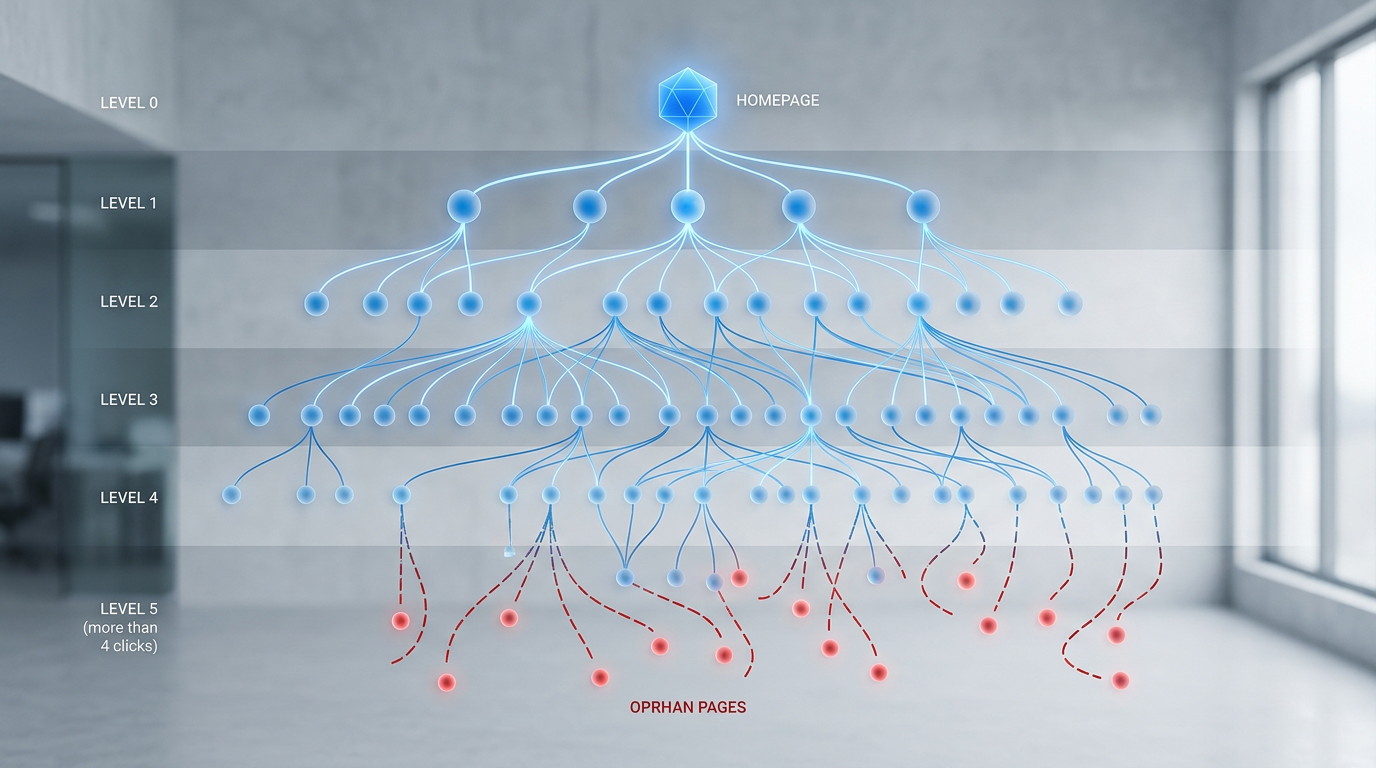
Crawl budget is a real, finite resource. Every second Googlebot spends on your site is precious. Don't waste it by making it click through a maze to find your most important content. A hard and fast rule for 2026 is that no critical SaaS landing page should be more than four clicks away from the homepage.
This includes your pricing page, key feature pages, and top-of-funnel solution pages. Use a crawler like SEOmator or Screaming Frog to visualize your site architecture. If you see long chains of internal links leading to valuable pages, you have a problem. You need to flatten your architecture and improve internal linking from high-authority pages like your homepage.
The sinister cousin of deep pages is the orphan page. These are pages that exist on your site but have no internal links pointing to them. They are undiscoverable to both users and crawlers, effectively wasting crawl budget and offering zero SEO value. Regular crawls are essential to identify and either integrate or delete these forgotten assets.
Phase 2: Mastering Performance and User Experience for SaaS
Here's where the generic checklists fall apart completely. For a SaaS platform, performance isn't just a ranking factor. It's directly tied to free trial sign-ups, demo requests, and customer retention. Slow, janky pages kill conversions.
The INP Imperative: Auditing Third-Party Scripts
Interaction to Next Paint (INP) is Google's metric for measuring page responsiveness. It replaced First Input Delay (FID) as a core web vital because it assesses the entire user session, not just the first interaction. For a dynamic SaaS dashboard or a complex pricing calculator, this is everything.
The biggest culprits of high INP are almost always third-party JavaScripts. That analytics tool, that A/B testing framework, that friendly little chatbot in the corner. Each one can block the main browser thread, making the page unresponsive when a user tries to click a button or open a dropdown menu. The page freezes, the user gets frustrated, and the conversion is lost.
Your audit must include a thorough inventory of every third-party script. Question everything. Does marketing really need three different tracking pixels on the upgrade page? Can that customer feedback widget be loaded with a delay, or only on specific pages? Work with your developers to defer or lazy-load non-essential scripts. If a fix requires significant code changes, it may be time to consult a web development agency that specializes in performance.
This isn't an abstract technical detail. It directly impacts your bottom line. As you hunt down what's causing these delays, you'll find that Google's documentation on Core Web Vitals is an indispensable resource for your team.
JavaScript Rendering: Friend or Foe?
Modern SaaS frontends, often built with frameworks like React, Angular, or Vue, rely heavily on JavaScript to render content. This creates a two-step process for Googlebot: first, it fetches the initial lightweight HTML, then it must execute the JavaScript to see the final, fully-rendered page.
If your JS bundles are bloated or your server is slow, that second step can take too long or even fail. The result? Google sees a blank page or a loading spinner, not the keyword-rich content you've meticulously crafted. Use Google Search Console's URL Inspection tool and run a live test. Toggle between the HTML and the screenshot view. If they don't match, you have a rendering problem.
Solutions can range from implementing server-side rendering (SSR) or static site generation (SSG) for key marketing pages to aggressively code-splitting your JavaScript so that only the necessary code is loaded for a given page. This isn't just an SEO fix; it dramatically improves the user experience for everyone.

Phase 3: The Modern SaaS SEO Audit Toolkit
You can't fix what you can't measure. Guesswork has no place in a technical audit. Your process needs to be data-driven, using a combination of first-party data and specialized third-party tools.
Core Tools: GSC and Crawlers
Google Search Console (GSC) is your direct line of communication with Google. It is non-negotiable. Spend time here daily, or at least weekly. Monitor the Coverage report for indexing errors, check the Core Web Vitals report to see how your pages perform with real users, and analyze the Performance report for keyword opportunities.
Alongside GSC, you need a robust website crawler. A tool like SEOmator is excellent for this. It will crawl your site just like Googlebot, flagging critical issues like broken links, redirect chains, duplicate content, and those pesky orphan pages we talked about earlier. Critically for SaaS, it can also be configured to render JavaScript, allowing you to spot issues that a simple HTML-only crawler would miss.
Advanced Monitoring with Looker Studio
While GSC and crawlers are great for deep dives, you need a high-level view for ongoing monitoring. This is where Looker Studio (formerly Google Data Studio) shines. You can build powerful dashboards that pull data directly from GSC, Google Analytics 4, and your rank tracking tool of choice.
Create a weekly monitoring dashboard that visualizes key trends at a glance. Are your indexed pages increasing or decreasing? Are there spikes in 404 errors? Is your organic traffic correlated with improvements in Core Web Vitals scores? This provides the C-suite with a clear view of SEO performance and helps your team stay focused on the metrics that matter.
Putting It All Together: A Cadence for Success
A one-off audit is a snapshot in time. A truly effective technical SEO strategy is an ongoing process. The market changes, your product evolves, and Google's algorithm is a moving target. Success requires a rhythm of continuous monitoring and periodic deep dives.
We recommend a quarterly cadence for a full, 200+ item audit. This balances the need for deep analysis with the reality of development resources. This deep dive covers everything we've discussed: crawlability, indexing, performance, JS rendering, and schema. It's the full health checkup.
Between these quarterly audits, rely on your Looker Studio dashboard for weekly monitoring. This is your early warning system. Spikes in crawl errors or a dip in performance scores can be caught and addressed before they become major problems. This dual-pronged approach, which a savvy digital marketing agency would champion, ensures your SaaS platform isn't just technically sound today, but remains resilient and competitive for years to come.
So, take a look at your current SEO process. If it doesn't account for the unique technical stack of your SaaS product, it's time to start asking harder questions. The first one should be: what, exactly, is that third-party script on our pricing page doing?