wordpress to react migration: what to really expect
thinking of moving from wordpress to react? this move is more than a code swap. here’s a look at the real operational changes you should expect for your team.

It sounds strange, but the single biggest reason teams migrate from WordPress is also its greatest strength: market dominance. The platform powers an incredible 43.4% of the entire web for a reason. It's accessible, extensible, and familiar.
But that massive ecosystem, with its 65,000+ plugins and legacy code, creates a unique gravity. For high-growth companies, that gravity eventually pulls performance, security, and scalability down. A WordPress to React migration isn't just about escaping a platform. It's a strategic pivot toward a modern, component-driven web experience.
The conversation is no longer about abandoning WordPress entirely. It’s about redefining its role. The smartest teams are keeping WordPress as a robust content engine while building a lightning-fast React or Next.js front end. This is the headless model, and it's where the web is going.
Why Even Consider a Migration? The Shift to Headless
The decision to migrate is rarely about one single problem. It’s a series of small frictions that accumulate until the cost of staying put outweighs the cost of a rebuild. Sluggish admin panels, plugin conflicts after every update, and a constant battle to optimize for Core Web Vitals are common triggers.
While WordPress is still the king of the CMS-based web, accounting for over 61% of the market, a different story is emerging at the top. For the highest-traffic websites, the trend is clear. Recent data shows Next.js overtaking WordPress among high-traffic sites, with a 24.9% share compared to WordPress's 22.4% in the top 10k. The biggest migration path? You guessed it: from WordPress to Next.js.
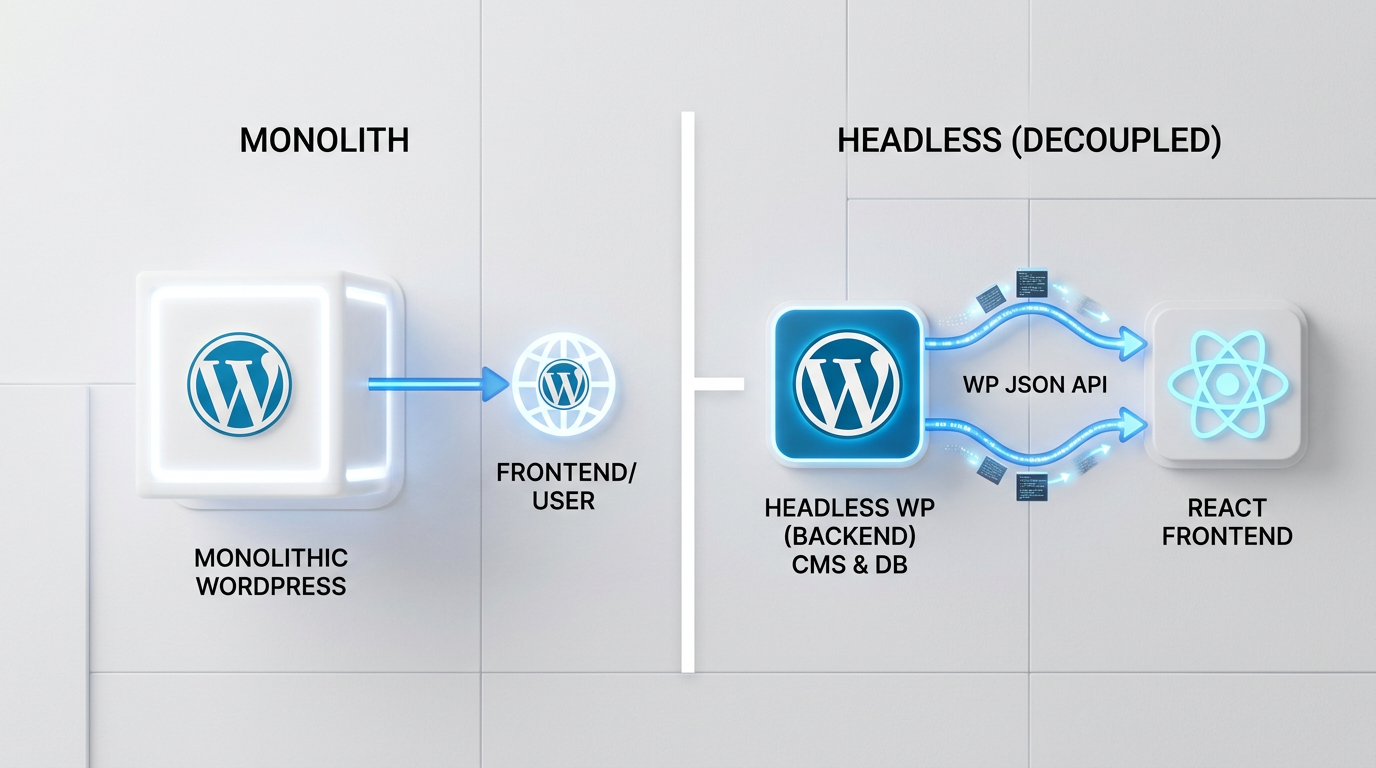
This isn't about features. It’s about architecture. A traditional, or monolithic, WordPress site bundles the back end (content management) and front end (what users see) together. A headless setup decouples them. Your content lives in WordPress, managed through its familiar editor, but it’s delivered via an API to a custom-built React application.
The result is a massive performance boost. React and frameworks like Next.js are built for speed, server-side rendering, and exceptional scores on Google's Core Web Vitals. For businesses where site speed directly impacts revenue and SEO rankings, this advantage alone is often enough to justify the switch. A top web development agency can help map these performance gains to your specific business goals.
The Operational Reality: More Than Just a Code Swap
Many leaders focus on the technology, but the most profound changes from a WordPress to React migration are operational. Your team's daily workflows will change. Ignoring this is the fastest way to a frustrating project that fails to deliver on its promise.
This is about preparing your marketing, content, and development teams for a new way of working. The technology is just the enabler. The real win comes from building a more intentional, scalable, and powerful content operation on top of it.
Content Modeling Reimagined: Beyond Posts and Pages
In WordPress, everything tends to be a 'post' or a 'page', often mashed together with a complex page builder plugin. A headless architecture forces you to think more structurally. Your content is no longer a block of HTML on a page. It becomes structured data.
You'll start defining 'content models'. A 'testimonial' model might have fields for a quote, author name, company, and headshot. A 'service' model might include a short description, a list of key features, and a link to a case study. WordPress can handle this beautifully with custom post types and fields, but the migration process makes this structured approach mandatory.
This is a an enormous advantage long-term. Your content becomes reusable, API-first, and ready for any channel, not just your website. Want to pull customer testimonials into a mobile app? With a headless setup, it's a simple API call away.
The New Preview Workflow: What Happens to WYSIWYG?
One of the biggest workflow adjustments for content teams is the preview functionality. In traditional WordPress, you click 'Preview' and see exactly what the page will look like. In a headless setup, WordPress doesn't know what the final front end looks like. This disconnect can be jarring.
Modern headless solutions solve this. Using frameworks like Next.js, developers can create a live preview mode that connects to the WordPress backend. When a content editor makes a change in the WordPress draft, the connected React front end updates in real-time in a separate browser tab. It's a different workflow, but once established, it's just as powerful.
This requires careful planning and is a key part of our software development services when we scope a migration. Ensuring the content team has a seamless editing and previewing experience is non-negotiable for adoption.
Redirect Governance and SEO Continuity
This is where migrations can go horribly wrong. Years of accumulated SEO value can be wiped out with a poorly planned URL strategy. Every link, every redirect, and every URL structure from your old WordPress site must be meticulously mapped and preserved or intentionally redirected.
Your team needs a rock-solid plan for 301 redirects. This isn't just about matching old URLs to new ones. It involves a full audit of your internal linking structure, canonical tags, and XML sitemaps. The new React site needs to be built with SEO at its core, not as an afterthought.
This process demands expertise. A single mistake can impact rankings for months. Working with dedicated seo services that specialize in technical migrations is crucial for protecting your organic traffic and ensuring a smooth transition in the eyes of search engines.

Planning Your Migration: The Audit-First Framework
Success is determined before a single line of React code is written. A comprehensive, audit-first approach is the only way to de-risk a project of this complexity. You cannot build the new house without a perfect blueprint of the old one.
Start by creating a complete inventory of your current WordPress site. This isn't a quick scan. It's a deep-dive investigation into every functional and content-related aspect of your digital presence. Get granular. The more detail you capture now, the fewer surprises you'll have during development.
Your audit checklist should be exhaustive and cover several key areas. Think of it as mapping your site's entire digital DNA. A successful audit is the foundation of your entire project.
- Plugins and Integrations: What does each plugin do? Is it for the front end or back end? Which ones can be retired, and which functionalities need to be rebuilt in the new system?
- Content & URL Structure: Document all custom post types, taxonomies, and custom fields. Map every single URL and decide if it will stay the same or be redirected.
- User Roles & Permissions: Who has access to what? How will these roles translate to the headless environment?
- Third-Party Scripts: Every marketing tag, analytics script, and tracking pixel needs to be identified and planned for.
- SEO Elements: Beyond URLs, document your metadata formats, schema markup, and canonicalization rules.
This audit document becomes the source of truth for the project. It informs the technical architecture, guides the development process, and ensures that critical business functions aren't lost in the transition. The WordPress REST API will be the primary tool for exposing this audited content structure to your new React front end.
Headless WordPress or Full Replatforming?
The beauty of this architectural shift is that you have options. The most common path is to keep WordPress as a headless CMS. Your team continues to use the familiar WordPress admin for content creation, but that content is served to a brand new, custom-built React or Next.js application.
This hybrid approach gives you the best of both worlds. Your content team gets the mature, user-friendly CMS they know, while your developers get to build with modern tools that deliver superior performance and maintainability. You leverage WordPress's strengths in content management without being shackled by its front-end limitations.
In some cases, a full replatforming to a different headless CMS might make sense. This is usually when the content models are so complex or the scale is so massive that even WordPress's backend becomes a bottleneck. However, for the vast majority of companies migrating from a traditional WordPress setup, using it in a headless capacity is the most efficient and effective path forward.
The choice depends entirely on the results of your audit. What does your content look like? How does your team work? Answering those questions honestly will point you to the right architectural decision. The final step is to find a partner who can execute that vision. Before you can build anything, you need a plan, and the best way to get one is to start your project with a thorough discovery process.